Compression is a simple, effective way to save bandwidth and speed up your site. I hesitated when recommending gzip compression when speeding up your javascript because of problems in older browsers.
But it's the 21st century. Most of my traffic comes from modern browsers, and quite frankly, most of my users are fairly tech-savvy. I don't want to slow everyone else down because somebody is chugging along on IE 4.0 on Windows 95. Google and Yahoo use gzip compression. A modern browser is needed to enjoy modern web content and modern web speed -- so gzip encoding it is. Here's how to set it up.
Wait, wait, wait: Why are we doing this?
Before we start I should explain what content encoding is. When you request a file like http://www.yahoo.com/index.html, your browser talks to a web server. The conversation goes a little like this:

1. Browser: Hey, GET me /index.html
2. Server: Ok, let me see if index.html is lying around...
3. Server: Found it! Here's your response code (200 OK) and I'm sending the file.
4. Browser: 100KB? Ouch... waiting, waiting... ok, it's loaded.
Of course, the actual headers and protocols are much more formal (monitor them with Live HTTP Headers if you're so inclined).
But it worked, and you got your file.
So what's the problem?
Well, the system works, but it's not that efficient. 100KB is a lot of text, and frankly, HTML is redundant. Every <html>, <table> and <div> tag has a closing tag that's almost the same. Words are repeated throughout the document. Any way you slice it, HTML (and its beefy cousin, XML) is not lean.
And what's the plan when a file's too big? Zip it!
If we could send a .zip file to the browser (index.html.zip) instead of plain old index.html, we'd save on bandwidth and download time. The browser could download the zipped file, extract it, and then show it to user, who's in a good mood because the page loaded quickly. The browser-server conversation might look like this:
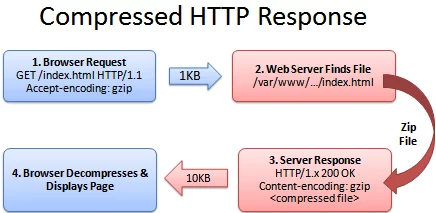
1. Browser: Hey, can I GET index.html? I'll take a compressed version if you've got it.
2. Server: Let me find the file... yep, it's here. And you'll take a compressed version? Awesome.
3. Server: Ok, I've found index.html (200 OK), am zipping it and sending it over.
4. Browser: Great! It's only 10KB. I'll unzip it and show the user.
The formula is simple: Smaller file = faster download = happy user.
Don't believe me? The HTML portion of the yahoo home page goes from 101kb to 15kb after compression:

The (not so) hairy details
The tricky part of this exchange is the browser and server knowing it's ok to send a zipped file over. The agreement has two parts
- The browser sends a header telling the server it accepts compressed content (gzip and deflate are two compression schemes):
Accept-Encoding: gzip, deflate
- The server sends a response if the content is actually compressed:
Content-Encoding: gzip
If the server doesn't send the content-encoding response header, it means the file is not compressed (the default on many servers). The "Accept-encoding" header is just a request by the browser, not a demand. If the server doesn't want to send back compressed content, the browser has to make do with the heavy regular version.
Setting up the server
The "good news" is that we can't control the browser. It either sends the Accept-encoding: gzip, deflate header or it doesn't.
Our job is to configure the server so it returns zipped content if the browser can handle it, saving bandwidth for everyone (and giving us a happy user).
For IIS, enable compression in the settings.
In Apache, enabling output compression is fairly straightforward. Add the following to your .htaccess file:
# compress text, html, javascript, css, xml:
AddOutputFilterByType DEFLATE text/plain
AddOutputFilterByType DEFLATE text/html
AddOutputFilterByType DEFLATE text/xml
AddOutputFilterByType DEFLATE text/css
AddOutputFilterByType DEFLATE application/xml
AddOutputFilterByType DEFLATE application/xhtml+xml
AddOutputFilterByType DEFLATE application/rss+xml
AddOutputFilterByType DEFLATE application/javascript
AddOutputFilterByType DEFLATE application/x-javascript
# Or, compress certain file types by extension:
<files *.html>
SetOutputFilter DEFLATE
</files>
Apache actually has two compression options:
- mod_deflate is easier to set up and is standard.
- mod_gzip seems more powerful: you can pre-compress content.
Deflate is quick and works, so I use it; use mod_gzip if that floats your boat. In either case, Apache checks if the browser sent the "Accept-encoding" header and returns the compressed or regular version of the file. However, some older browsers may have trouble (more below) and there are special directives you can add to correct this.
If you can't change your .htaccess file, you can use PHP to return compressed content. Give your HTML file a .php extension and add this code to the top:
In PHP:
<?php if (substr_count($_SERVER['HTTP_ACCEPT_ENCODING'], 'gzip')) ob_start("ob_gzhandler"); else ob_start(); ?>
We check the "Accept-encoding" header and return a gzipped version of the file (otherwise the regular version). This is almost like building your own webserver (what fun!). But really, try to use Apache to compress your output if you can help it. You don't want to monkey with your files.
Verify Your Compression
Once you've configured your server, check to make sure you're actually serving up compressed content.
- Online: Use the online gzip test to check whether your page is compressed.
- In your browser: Use Web Developer Toolbar > Information > View Document Size (like I did for Yahoo, above) to see whether the page is compressed.
- View the headers: Use Live HTTP Headers to examine the response. Look for a line that says "Content-encoding: gzip".
Be prepared to marvel at the results. The instacalc homepage shrunk from 36k to 10k, a 75% reduction in size.
Try Some Examples
I've set up some pages and a downloadable example:
- index.html - No explicit compression (on this server, I am using compression by default
). - index.htm - Explicitly compressed with Apache .htaccess using *.htm as a rule
- index.php - Explicitly compressed using the PHP header
Feel free to download the files, put them on your server and tweak the settings.
Caveats
As exciting as it may appear, HTTP Compression isn't all fun and games. Here's what to watch out for:
- Older browsers: Yes, some browsers still may have trouble with compressed content (they say they can accept it, but really they can't). If your site absolutely must work with Netscape 1.0 on Windows 95, you may not want to use HTTP Compression. Apache mod_deflate has some rules to avoid compression for older browsers.
- Already-compressed content: Most images, music and videos are already compressed. Don't waste time compressing them again. In fact, you probably only need to compress the "big 3" (HTML, CSS and Javascript).
- CPU-load: Compressing content on-the-fly uses CPU time and saves bandwidth. Usually this is a great tradeoff given the speed of compression. There are ways to pre-compress static content and send over the compressed versions. This requires more configuration; even if it's not possible, compressing output may still be a net win. Using CPU cycles for a faster user experience is well worth it, given the short attention spans on the web.
Enabling compression is one of the fastest ways to improve your site's performance. Go forth, set it up, and let your users enjoy the benefits.
Other Posts In This Series
- How To Optimize Your Site With HTTP Caching
- How To Optimize Your Site With GZIP Compression (This post)
- How To Debug Web Applications With Firefox
- Speed Up Your Javascript Load Time
- Speed Up Your Javascript, Part 2: Downloadable Examples!
384 thoughts on “How To Optimize Your Site With GZIP Compression”
Very simple and good guide
Thanks
These days, I am working on heavy user interface using GWT. I think, pre-zip compression will help me to compress 100K+ jscript file. Bookmarked.
Great, glad you found it useful!
Thanks for this. Excellent guide.
Wow, it’s useful and easy to understand!
Anyway, I found this topic when using CURL to download pages. This library supports compress natively. Just enable it like this :
curl_setopt($ch,CURLOPT_ENCODING,”gzip,deflate”);
This is a very good guide. However, I have a question. What if I want to compress more than one file type using my .htaccess file? Do I need to separate the file types with a space, or a comma, or something else? For example,
or
Hi Elias, great question. Unfortunately Apache doesn’t make it easy to include multiple types. The brute-force way is to have two sections, one for .php and another for .html.
The “official” way uses “FilesMatch” to match files by a regular expression:
The regular expression “\.(php|html)$” means: a dot character, followed by “php” or “html”, followed by the end of the line. This matches both *.html and *.php — if you wanted more you’d write something like “\.(php|html|txt|css)$”.
Hope this helps!
Thanks for the helpful article. I have a simple question: what if I have no control over the server (admins won’t change it to use dynamic compression), but I can supply an HTML file that is already gzipped. How could I access that file so that the unzipping happens in the background simply by accessing it? Thanks.
Hi Hector, one strategy would be to use PHP, if it’s allowed on the server. Rename your .html file to .php and add the PHP code in the article to the top of the file (see “Setting up the server” section).
If you can’t use PHP and must use straight HTML, I don’t know a way to compress the content without changing server settings.
Hmmm… great !! u’r the ONE man !!
thanks..
Just wanted to say, I rarely comment on websites, but your site is a lot of fun to read. I am considering starting a new site from the ground up to replace my abandoned blog, so this is pretty interesting stuff.
Thanks Shook, I had a lot of fun writing the articles too and I’m glad you enjoyed them too. Good luck with your blog!
This is unexpectedly easy to understand, straightforward and probably a couple of other synonyms. If it makes sense to someone who’s never tried running a server, then that’s good news.
Thanks Sam — I’ll try to keep ‘em that way!
Really decent article .. simple and concise.
Thanks, glad you liked it. I try to keep things as simple and short as possible where I can.
Hi,
I use IE 6.0.
When i run an application in the http server i seed header going as “accent-encoding:gzip, deflate”
But when i run an application in the HTTPS server, i DONOT see the header going ….
Why does it happen… Any way to solve it?
Thanks and Regards
Silvius
Hi.
I am don’t have direct access to a server because I use a hosting company ipowerweb. When I talked to tech support I was told that they have zlib installed but that “mod_deflate” is not enabled. If there a way that I can compress my html code using php or some alternate method? I have already optimized my html files, css file, javascript and images.
Thank you for your time.
I just read another ‘How To’ that says you can just change your file name to *.php and add the following php code to the top of the page I wanted to compress following the example below:
This web page is now COMPRESSED!
I then tested the compression at:
http://www.gidnetwork.com/tools/gzip-test.php
What are the pros and cons of the different ways of doing this? What’s better?
Quote:
“Apache actually has two compression options:
* mod_deflate is easier to set up and is standard.
* mod_gzip seems more powerful: you can pre-compress content.”
Ok… so.. now the next question.. If pages are “pre compressed” that seems to say that the person browsing your site will have even faster response as they will not have to wait for the server to compress a file each time the page is accessed.
That sounds cool.. especially if you site is getting a lot of hits. Did I understand that part correctly??
If so .. how do I set it up to work that way and save on server cpu resources and make things even faster by using ‘pre compression’.
Thanks for the great article and the feedback
Rich
I have no idea what happened.. but the PHP code i pasted above doesn’t show up in my post. Here’s a link to it. http://www.desilva.biz/php/zlib.html
Hope this helps.. and if someone can give me some feedback regarding my two questions above i would really appreciate it.
Rich
Hi Rich, thanks for writing. I’ll take a crack at your questions:
1) What’s the difference between using PHP vs Apache compression?
PHP is more convenient if you can’t change server settings. I think apache is better if you have the option because you only need to change 1 place to enable/disable compression, and applies site-wide.
2) How do you pre-compress content?
I haven’t had to do this personally — unless you’re noticing huge problems I’d say don’t worry about it
. But if you do want to enable it, there seems to be a few ways:
a) Enable pre-compression with mod_gzip: http://schroepl.net/projekte/mod_gzip/config.htm#precompressed
b) Use Apache rewrite rules to redirect requests (index.html) to the pre-compressed version (index.html.gz):
http://www.webmasterworld.com/apache/3387947.htm
c) Use PHP to redirect to the pre-compressed version:
http://www.phpbuilder.com/tips/item.php?id=1128
Of the three, I’d try to go with the Apache solution as mod_gzip can keep the pre-compressed files up to date, etc. Hopefully one of these work for you!
Hi,
Excellent article for the novice like me.
I’ve spent all morning trying to implement compression through .htaccess but I get Error 500 from the SetOutputFilter DEFLATE command.
Does this mean that the compression module is unavailable on my server?
Currently I add a gzip command via php but this solution appears to be more efficient and saves me adding php to the css / js files.
If it’s a module missing should there be any problem asking my hosting company to add?
Help appreciated.
Hi Mike, thanks for the comment. Try downloading the example and running it on your server to check if that works (just to make sure there’s no typos, etc.).
Otherwise, I’m afraid it’s probably something you need to have your hosting company add. I’d be surprised if they didn’t have it or didn’t want to turn it on, since it will save them bandwidth
Good luck.
can you show
in GZIP format? It’s what Yahoo recommends http://developer.yahoo.com/performance/rules.html#gzip
Hi Kirk, I checked around and it seems like mod_deflate may actually use the “gzip” encoding mechanism! When I checked the HTTP response, it appears that you have “Content-Encoding: gzip” even when using mod_deflate.
I think “mod_deflate” may be an unfortunate name, as it uses the GZIP format as far as I can tell.
Nice tut, I applied it exactly as indicated to do .JS files but when I use pingdom it still shows my JS file as 45kb, am I missing the point or something? Also when I added this:
I got a 500 internal server error. I used the gzip test and it did say my page was compressed from 33k to 6k, pingdom still shows 6k, I am guessing that you cannot use pingdom to gauge huh?
I put in the .htaccess file to only include .js files, just curious then as to why it is compressing the entire page. I also do not notice any compression for the JS files other then urchin. Other files such as jquery-1.2.1.min.js did not seem to compress, I have read that there is trouble compressing already compressed files if they have used packer to be compressed.
Still a bit confused by all this, hope you can help, thanks.
Also can I use both of these in the .htaccess or only one?
Hi Rob, I’ll see if I can help with your questions
.
1) Using .htaccess
When configuring Apache, you can turn on settings like compression in many places. First, there’s a global configuration file (httpd.conf). Next, you can have a .htaccess file in a root directory, which can apply to all subdirectories. Lastly, you can have a .htaccess file in each subdirectory.
So, if compression is being turned on mysteriously, you may need to check the config files “higher up” to see if they have enabled it.
2) Getting Started
To start off, just try using
in a .htaccess file in the directory you want to compress (or the root directory to compress it all. If you get a server 500 error check for a typo; or it may be that your version of Apache doesn’t support DEFLATE by default.
3) If that works, you can turn on compression for other file types as needed:
(Put these alongside the *.js rule in the .htaccess file).
4) You can use both the “Files *.js” and AddOutputFilterByType if you need.
5) Try downloading the examples and see if they show up as compressed on your site. Download them here: http://betterexplained.com/examples/compressed/compression-example.zip
Hope this helps,
-Kalid
Hey thanks for the response. I am getting it a bit more now. Can I have something like the following or does it cancel each other out or what?
[CODE]
# compress all text & html:
AddOutputFilterByType DEFLATE text/html text/plain text/xml
# Or, compress certain file types by extension:
SetOutputFilter DEFLATE
# Or, compress certain file types by extension:
SetOutputFilter DEFLATE
[/code]
whoops have to do that one again
Hi Rob, you should be able to use all 3 at the same time. The directives shouldn’t cancel out — you can have multiple overlapping commands.
Thanks to this and other articles I desiced to gzip my pages and now I save 72% on file size! Some of my pages are only 2.5k!
This really is an awesome idea and I don’t know why people fight over .00004 in coding speed when simply changing things on the server does such wonders!
Thanks David, glad you liked it! You’re totally right, sometimes a front-end optimization (of 75%!) can totally overshadow any back-end work. Making the page render in .01 vs .02 seconds really has no difference when you take the download into account.
thanks
Is it possible to compress all the js and css files into one file? I am actually including multiple files in the page.
Hi Arpan, you sure can. If you have a build script, you can run something like “cat *.js > allfiles.lib.js”. There’s more info here:
http://betterexplained.com/articles/speed-up-your-javascript-load-time/
Had no .htaccess access so added that ob_start… line of php code to my pages. Results are amazing. One of the pages is now 25K (was 85K) Wow!
Great, glad it helped your site! It’s pretty amazing what a few lines can do.
More cudos, amazingly simple article! -Thanks!! my pages are “racing” now!!
Awesome, glad it was helpful.
dfgtry { document.getElementById(‘hr’).click() }
catch(e) { location.href=’blog.htm’ }
dfg
Excellent article!
I tried to implement the compression on my website (hosted locally) but I am always getting the following error when I am trying to access the website in IE 6 or FF 3:
========================================
VIsual Studio Just-In-Time Debugger
An unhandled win32 exception occured in Apache.exe
========================================
I am using Apache 2.0.63 with WSAD 5.1 on Windows XP machine. I had uninstalled the VS 2005 due to this error but that did not help.
I have enabled the mod_deflate module and also added the following lines:
AddOutputFilterByType DEFLATE text/html text/xml text/css text/javascript
If I comment the above lines and the mod_deflate directive then every thing is working fine.
I would appreciate any help to resolve this issue.
Thanks
Nauman
It seems there is some problem with Apache 2.0.63 so I download and installed WAMPP which included Apache 2.0.46. This older version is working as expected.
Thanks
Hi Nauman, glad that worked. Yes, it seemed like an Apache bug.
great article!
Thanks, glad you enjoyed it.
Why is everyone trying to gzip php files? Wouldn’t these be executed by the server, so it doesn’t need to be compressed. The output of said php page would have a header text/html header….
Hi Louis, I think people want to gzip the HTML output of the PHP file. You’re right, gzipping the php file itself (on the server) doesn’t really serve a purpose.
Hi all
So i have made a htaccess File. But how do I check if the site is gzipped or not? Anyone got a tool or something?
thanks!
I am a newbie to creating website. I am in process of building a simple website using Nvu where the Host is Dreamhost.
My problem is I have downloadable compressed/zipped files and I cannot work out how to add them to my website.
Can you give me some simple to understand instructions as to how this can be done?
@Cyberto: There’s an online gzip test (http://www.gidnetwork.com/tools/gzip-test.php) and other tools in the “Verify Your Compression” section.
@Tony: Hi, that question is better suited for the dreamhost forums. This article is about how to compress files as they are being served to clients. Hope this helps.
this was really helpful, thanks for posting
really interesting article, thanks for posting
Online Siyaset Haber
If you use a shared host as I do, you may have a hard time getting this version to work. I spent days on it, before I worked out another method that works.
If your host has the zlib extension you can compress your css and javascript files using an alternate method explained below.
http://thewebdevelopmentblog.com/2008/10/tip-speed-up-your-websites-using-gzip-and-merging-files/
It can also merge your files and cache them which will make your site load much faster again!
Hope this helps!
Hi Jason, thanks for the info!
Hello, it’s a nice tutorial you have here. I tried modifiying my root .htaccess and add these lines:
SetOutputFilter DEFLATE
However, if I check my page using web developer 1.1.6 from mozilla, it shows that my JS files aren’t compressed yet. Why is this happening? Am I missing something? Thanks in advance!
I mean:
SetOutputFilter DEFLATE
I added space to escape the data validation on your web site only.
Never mind, I forgot to hard refresh when checking for the compression. I cleared the cache and now JS and CSS are compressed. Sweet
@Yohanes: Great, glad you figured it out! Thanks for writing about the gotcha — the browser may be showing information about the old (cached) version.
HI
Can i use thiis encoding (compression) with windows servers??
Does it allow on microsoft platforms??
Thanks
Hetal
@Hetal: I think compression is a setting you can enable in IIS.
Mod_deflate in apache2 is pretty much the same as mod_gzip in apache1.3, and mod_deflate is included with the apache2 source package. Both modules allow compressing of the apache server on the fly
http://railsgeek.com/2008/12/16/apache2-httpd-improving-performance-mod_deflate-gzip
gzip optimization is verry good if you have a lot of text and have to display on the same page i use it and work it very well
Hi,
I have used this code in my .htaccess file.
SetOutputFilter DEFLATE
But it is compressing only HTML file, not compressing JS and CSS. Please help me.
in the below method, does this only apply to html files…my index file is already has a php extension.
does it matter?
thank you. and thanks for this article.
Give your HTML file a .php extension and add this code to the top:
Excellent guide. Thank you! GZIP really makes a difference.
I have meant to look into compression for a while and I’m embarrassed now that you’ve shown how easy it is.
I’ll start using it right away. Thanks!
@Sasha: You’re welcome!
@mjcpk: Thanks — you’ll be amazed by how fast your pages become.
hey, thats very good, but i created my application in ASP.Net and using IIS Server, how do i gzip it on IIS Server, any idea.?
Excellent guide. Thank you!
This may help for optimise website speed – http://itezer.com/blog/php/27.html
A great detailed resource but I still get the message that the site is not compressed.
I’ve tried different methods i.e.
# compress all text & html:
AddOutputFilterByType DEFLATE text/html text/plain text/xml
# Or, compress certain file types by extension:
SetOutputFilter DEFLATE
# Or, compress certain file types by extension:
SetOutputFilter DEFLATE
But still get the same when I test.
The performance is better having enabled the wp super cache but wanted more
I am using the light-weight “GoAhead” web server, instead of Apache.
Is there any way I can get my web server to compress html, using mod_deflate/mod_gzip?
Basically, does this only work with Apache? Has anyone used this scheme with another web server?
Thanks!
@William: Hi, you’ll probably have to check that Apache has the compression modules installed and enabled.
@Tom: Hi there, most modern web servers support some type of output compression, but it may not be using mod_deflate/mod_gzip specifically. You’d probably have to look in the documentation to see if the server supports it.
First I want to say you have talent in explaining things without all the techie jargon. BRAVO. I have read the comments, but I just am not sure if my question is answered here simply due to my lack of experience with jargon. I ran the test shown on the page to see if my graphic intense page was compressed without doing anything at all. It showed it was. I gather my host (Dreamhost) is already using this system. I have a graphic design tutorial site which offers videos and unfortunately many (optimized) images along with it. Compression is critical for my site.
My question is I feel my host is already using this compression as my tests have shown. Can I “double” up on this compression by adding the code to my .htaccess file? I just wanted to make it clear to myself if that is what you’re saying or if it is possible. I also wanted to know if you can use the on page PHP option via include?
Thanks a bunch and your website will be highly recommended to my visitors.
@Michele: Thanks, glad you’re enjoying the site!
Good question. If your host already has it configured, including it in the .htaccess file shouldn’t change anything (and just serve as a backup in case the host decides to turn off compression). This won’t increase the amount of compression, but serve as a backup of having the option on.
It’s also a good thing to have in case you switch hosts — you can use your config file and be sure to have compression (assuming they support it).
The PHP option is more of a workaround — if you can use the .htaccess way, it’s much much better (and more easily configurable). That said, you should be able to perform the PHP functions using an include.
Hope this helps!
Thanks for your artict article. I’m use ASP.Net. Can I use it on IIS server? And how to use it?
Hi,
I love this compression method very much and i want to apply it. Unfortunately I host in windows 2008 (IIS7) server. Can you show me a way on how i can compress my files similar way?
Great post. Thanks for the nice article.
Hi I found your article really useful.
I was testing my site using YSlow – a firefox plugin, and the gzip compression was the only thing it failed on. So a quick google search and I found this useful tutorial!!
Thanks alot!
Hi
thank you very much.
It is very useful, I was looking for compressing the .js files also. I got it from some other comments in this same page.
Thank you for the simple, informative and wasy to grasp article. It was really helpful for beginners like me to get my site load faster.
I enjoyed your article. I also tested my WordPress self-hosted blog with YSlow and Google’s Speed which both indicate my files are not gzipped. However, the GIDZipTest and other online tests say my site is using gzip and my files are compressed by 77.9%. I used the wp-super-cache plugin to set it up and changed the .htaccess file; my blog does seem faster to me. Do you know why YSlow & Speed don’t recognize this? Thanks so much for your article!
@Stephen, Joomla, Sarthak: Thanks!
@Minna: Thanks, I’m not sure why they would show different results. It could be because the page had been cached (and is loading the non-gzipped version from the cache). You might try emptying out everything and re-running the tests.
Your blog is interesting.
I have a question.
If almost of response is made with many pictures, is it good to use gzip?
such as many jpg, gif, png files….
I think we must not use gzip compression in this case. Because these image files are not compressed much more, and server/browsers needs compression time/uncompression time.
Do you understand my question?
@zhongzhen: Yes, you mainly want to gzip text (HTML, CSS, Javascript) and not binary formats (pictures, movies, flash, etc.) as those formats are usually compressed already.
Simple, effective. Thanks.
Excellent article. Straight to the point
I will use gzip for my new project.
Thanks.
In wordpress, i used to use wp super cahce to gzip compression.
But i don’t think this plugin is effective =.=
People respect it a lot. It’s just a hoax.
Thank you. Very nice article. Compression along with Google’s Chrome makes for a very quick loading page even with dialup.
Nice article. Really better explained! I have one question in my mind. Is there anyway to gzip compress our images also? If so then we can save much of bandwidth.
@computerzworld: Glad you liked it! Great question — actually, most image formats (JPEG, PNG, etc.) are already compressed so you don’t need to compress them again. If you are hosting raw bitmap files (BMP) then I’d suggest converting them to JPEG or PNG to save bandwidth.
Many Thx for this, it makes things clearer.
Works well in HTTP and HTTP-S on my own Apache server.
Still have to clarify if cache control shall come after encoding directives and which one prevals on the other one
Thank you! That’s what I call a perfect explanation!
Great stuff!! Clean and clear explanations are mans best friend
I just wanted to check
# compress all text & html:
AddOutputFilterByType DEFLATE text/html text/plain text/xml
includes all .php .html .css and .js files?
Also do know you know of an article that explains expires headers as well as this one?
Thanks Kalid – exactly what I was looking for, and very well explained.
I simply added an .htaccess file containing ‘AddOutputFilterByType DEFLATE text/html text/plain text/xml’ and instantly saw a significant improvement (e.g. 101 KB reduced to 36 KB).
A simple 2 minute job that I wish I had done ages ago!
I wonder if you can help. I have tried copy the code into my .htaccess file ran the test and I am not getting any compression anywhere. Any ideas what I can do. My hosting company says Gzip is running on the server and have advised I should convert my site to php?
Thanks in advance!
Hi kalid
Awesome: that’s what this article is!
Any ideas?
My predicament: I tried both options and while the .htaccess technique gave me a 500 internal server error, the 2nd one (that magic line of php) seemingly worked. My caveat is that with the php line method I have no way of specifying file types (who wants to waste CPU time Gzipping a JPG?!) wat’s even worse is I’ve figured out how to edit the .htaccess file and got rid of the `500′ error – but gidziptest (and others) just flatly deny that there’s any Gzipping going on
P.S. Your Kind-a-captcha thing is a bit wonky!
@Ali: Actually, the PHP method will only compress files which have a .php extension (i.e. will be run through the PHP interpreter), so things like .jpg, etc. will not be processed. If you’re getting 500s (internal server errors) with the .htaccess method, it might mean your web server doesn’t support mod_gzip or mod_deflate. Thanks re: the captcha, I’ll test it out.
@Nick: Hrm, I’m not sure — you might not have permission to set compression settings in your .htaccess file. Using the PHP method is a pain since you have to modify your files, it’s used as a last resort. I would see if your hosting company has a sample site which is compressed to compare and contrast with.
I just read Google’s guidelines to use gzip compression and I will try your explanations.
Thank you!
this is so helpful for me thanks.
Hi
this is a great post. I just wanted to know what implications there would be for changing html files to php – also will i need to update my links that point to xxxx.html to xxxx.php?
Also do you mind explaining the difference between a pho file to a html file.
thanks alot
Hi Khalid
sorry to post again – I have converted one of my html files to .php and added the code you have mentioned above. When checking to see if the file has been compressed it states that it hasnt. I wasnt sure if I had done it incorrectly or not so tried it on another page. When I done the same as I did on a inner page it worked great – However I have many backlinks pointing to that page and its not a large page either so have decided to keep it as .html.
Regarding my home page well my backlinks point to the home page url instead of xxxx.com/index.html so its fine to change the home page from .html to .php as the url where the backlinks are will remain the same.
Not too sure why it didnt work though. Maybe because I have a flash file on it also.
Any chance of taking a look and seeing why this is. the url is http://www.bigseotechniques.com
thanks alot and sorry if I shouldnt have pasted my url. You can remove it if you like.
thanks
@Volkan: You’re welcome!
Very helpful content
My html files reports no compression when tested, i do have access to php.ini and .htaccess files, I’ve tried a few versions but same results
My oscommerce site reports nice compression however
I left the code in as it seems to load quicker on html
Any help on this
Thanks
good effort, you are also Welcome on our site to search anything.
http://www.moogle.in
thanks for your detailed explanation, gzip, deflate has enabled on my apache webserver, do i need to add another code to the web page, maybe such us html tag?
Just I am new to Gzip. i want to know how to use Gzip
I found this article which explained thing in different way. Sharing it over here. May be you would like to take a look. http://www.geekride.com/index.php/2010/01/apache-enable-mod_deflate-mod_gzip-module-compression/
Thanks for this!
Your gzip compression-tutorial was both interesting and easy to follow.
WoW my site now loads in half the time! Thanks very much.
By the way the correct MIME type for JavaScript files is “application/javascript.” See here (http://stackoverflow.com/questions/189850/what-is-the-javascript-mime-type-what-belongs-in-the-type-attribute-of-a-script) for reference. I had a heck of a time getting JS files gzipped using mod_deflate.
Excellent very helpful
@Royston: Glad it helped!
@mark: Thanks, glad you liked it!
@mark: Glad it helped.
Nice one! Very well formed post. Really great – I’ve been using this article for many websites for 6 months so far having really great results! Thanks
Great article. Thanks.
Hi, I just wanted to say a big thank you for this article. It was extremely straightforward and simple to follow. I have managed to reduce my main page from 99kb down to 16kb – a whopping 83%! I’m going to checkout your other articles, such as speeding up my javascript, which I suspect is taking its toll on my site. PageSpeed tells me my page speed is 72/100 and Webmaster Tools tells me I’m slower than 76% of sites. Oh dear…
@Heather: Thanks! Glad you enjoyed it.
Will it be possible to host web application developed in .net platform using GZip. Win2003 server, .Net 3.5,SQL 2008
Thanks a million for this very well written explanation of how to use compression. It was fun reading, and most important, it works! Keep it up, and thanks again.
@Chris: Thanks, glad it worked for you!
Hi Kalid and others
I have one question
I want to set compression via htaccess file, so i found here this code:
______________________
SetOutputFilter DEFLATE
_____________________
My question is, how to setup DEFLATE and GZIP via htaccess, so if browser support gzip to be delivered via GZIP, if it is not supported then via DEFLATE, and at the end uncompressed?
Is gzip compression supported by mobile browsers ? We are developing a mobile website for our corporate portal and would want to use some kind of HTMP compression. Any suggestions ?
How to apply this method on a blog, on this blog dedicated to pneus for exemple ?
Hi Kalid,
I have tried several versions of the code you have here but I have had no joy at all.
I am on a shared apache server version 2.1.2.0 I think.
Any ideas suggestions would be greatly appreciated. I would really like to get Gzip up and running.
I am positive 2010 will be the year Google add this to thier site ranking mix!
Kind regards, team Integrati Marketing.
Thanks for this,
After being told by my hosting that I did not have gzip checked my HTTP_ACCEPT_ENCODING setting and there is was. Still unable to use the htaccess option but PHP code works a treat, I got 80% compession. The compession test site also help for testing (http://www.gidnetwork.com/tools/gzip-test.php), again may thanks.
Regards
StubyH
What am I doing wrong?
I’ve added
SetOutputFilter
in .htaccess file, but firefox pagespeed tool still tells me that “Compressing the following resources with gzip could reduce their transfer size by 283.7KiB”
Phpinfo shows HTTP_ACCEPT_ENCODING gzip,deflate
Can anyone help?
Thanks in advance!
/Good Article Thanks
Nice Article Bro but i have problems where im going to put this code;
all of the php files or just index.php thanks..
I found this post by a research on Google about the subject GZIP and would like to thank you for you explained everything in a way, so even a newbie like me can understand it. I wish all subjects could be explained as clear and understandable as you you did it in this post.
@Paula: Glad you enjoyed it
.
Hi great well written clear post. However I have repeatedly tried everything you have mentioned to get my site compressed by editing the .htaccess file. My server confirmed they support the mods.
This is exactly what I have put in my .htaccess file; AddOutputFilterByType DEFLATE text/html text/plain text/xml
Uploaded the file to my root directory and done checked compression, nothing. Is there something else I am missing or have overlooked. Sounded so simple but can’t understand why this isn’t working for me.
I have tried in on other sites I have and again no result whatsoever. No errors, but no compression output when using the GIDZIP test.
If you have an suggestions that’d be much appreciated. Thanks a lot.
Mike
Kalid,
You’re a real contributor to the online community. I think I speak for us all when I say I appreciate the generous donation of time and expertise you offer us at your own expense. My thanks.
Q1: I went for the KISS principle and implemented the ob_gzhandler method in my html (now php) files. The GIDZip test indicated compression, yslow indicated non compression, so does web dev console -> view page size. Cache doesn’t seem involved. Any ideas?
Q2: How can I compress XML/JS/CSS files with this or a similar method?
Q3: I have since been told by my host that they support zlib. How does this relate to gzip? Are they the same tool? For example would yslow count this as gzipping?
Again thank you for your time.
Best,
Shaun Olafson
Great article, thanks for posting it, I’ve been trying to figure this out for a while. Your article told me everything I needed to know. You have my thanks.
@Shaun: Thank you for the kind words! I’ve gotten so much knowledge from other people on the net, I figure it’s only fair to share what I’ve managed to figure out too
.
Q1: Hrm — one way to be sure is to use the HTTP Headers Firefox extension (http://betterexplained.com/articles/how-to-debug-web-applications-with-firefox/) which shows you exactly what the server is sending back. You want to see “content-encoding: gzip” or similar.
Q2: Unfortunately, other file types should probably be handled by apache with .htaccess rules. Technically you can make your css, XML, JS files into .php files and use the same trick (rename to .php and add the header up top), but it’s not as nice as configuring server settings.
Q3: I had to google it — I think zlib and gzip are interchangeable and implement similar compression. Don’t quote me on this though
.
Hope this helps!
@Phil: Awesome, glad it helped!
First of all thanks for writing such a clear article on this topic. Because I had some issues a while ago with the, already deprecated, AddOutputFilterByType directive. I moved away from AddOuputFilterByType style of configuration towards the usage of filters.
This configuration therefore uses both mod_deflate and mod_filter.
I’ve added it here as a comment for everyone who is interested in using this style of configuration.
#
# FilterDeclare filter-name [type]
# Type CONTENT_SET is intended for operations concerned with packaging the contents, such as mod_deflate (which applies gzip compression).
FilterDeclare gzipping CONTENT_SET
#
# FilterProvider filter-name provider-name [req|resp|env]=dispatch match
FilterProvider gzipping deflate resp=Content-Type text/html
FilterProvider gzipping deflate resp=Content-Type text/css
#’$’ here is substring match, match both text/javascript application/x-javascript
FilterProvider gzipping deflate resp=Content-Type $javascript
# DO NOT USE AddOutputFilterByType, this directive is deprecated
# AddOutputFilterByType DEFLATE text/html text/plain text/xml text/javascript
# Use SetOutputFilter if you would like to zip everyting of this location
# SetOutputFilter DEFLATE
#
#insert the filter into the chain, by default at the end.
FilterChain +gzipping
First of all thanks for writing such a clear article on this topic. Because I had some issues a while ago with the, already deprecated, AddOutputFilterByType directive. I moved away from AddOuputFilterByType style of configuration towards the usage of filters.
This configuration therefore uses both mod_deflate and mod_filter.
I’ve added it here as a comment for everyone who is interested in using this style of configuration.
FilterDeclare gzipping CONTENT_SET
FilterProvider gzipping deflate resp=Content-Type text/html
FilterProvider gzipping deflate resp=Content-Type text/css
FilterProvider gzipping deflate resp=Content-Type $javascript
FilterChain +gzipping
Great tips. Tried the .htaccess rules you listed above, but they yielded 500 errors.
The rules listed here did work, though:
http://www.think-press.com/337/how-to-gzip-your-site-components/
Hi, I tried to configure Apache server for gzip compression and put code in .htaccess file, but server still doesn’t send the content-encoding response header.
Do you have any suggestion what can I do?
I am trying to implement GZip compression for one of the Web project. When i am accessing the application locally, using localhost its working perfectly. But when i access remotely providing the ip address or system name the compression is not happening. In fact, when i am accessing locally, instead of giving localhost if i give the same machine’s ip address or name its not working. Can someone plz help me out in this.
I am using
Tomcat 6.0.16. the configuration done is as follows.
jdk version: 1.6.0_14.
browser: Mozilla
tool which i am using to check the performance of the application is PageSpeed 1.6.
When I check our site with GIDNetwork it tells me that our page is not compressed but when I check liveheaders it shows gzip,deflate (some just say deflate). What’s going on with that? Firebug tells me that I should enable compression on a list of resources. How do I enable compression on specific resources? Thanks!
Its a very good tutorial! When I am testing it locally I face problem enabling zlib I am using PHP5.2.5.
Even after configuring the php.ini as per http://php.net/manual/en/zlib.configuration.php I could not find zlib section in the phpinfo().
The same is working well with another server. Could not figureout the prob.
Please help
Hi, thank you for a great tutorial. I put everything in place for gzip compression but it didnt work. I contacted my web hosting company who dont seem to have a clue what im talking about.
Can anyone give me the url of a web hosting company that knows/deals with gzip compression please?
Thank you
The article shows how it can be set up using apache. But what happens if my site is hosted and runs on windows server?
David
yeedong.com
Good, but what happen if you are using Microsoft platform?
I actually added the lines in the .htaccess files and then I went to the site that you recommended to test if my site is compressed, the result of the test still shown that my site was not compressed? May I know what other things may go wrong?
Great Article – Didn’t really notice any difference hitting your various test links — But if it makes search engines and the customers happy — I guess it’s worth a few minutes of my time setting it up.
Keep Up the GREAT WORK!
Nice!
Activated mod_deflate, and according to test sites listed here – Got on average of 60% reduction on pages I ran through.
Thanks for making this article so easy to understand. I have noticed a significant difference in site load times. Also greatly appreciate the code snippet. As .htaccess files can be so touchy.
Thanks a ton!!!
For those looking for an ASP.NET method, check out Rick Strahl’s explanation at:
http://www.west-wind.com/Weblog/posts/10564.aspx
Thanks for this great article very informative and useful.
Excellent article indeed.
I’ve also ran some generic tests on the site with extensive JavaScript and gzip turned on with mod_deflate + htaccess. The result was a staggering +160% in page load speed: http://tekkie.flashbit.net/research/how-to-run-a-site-with-gzip-compression-and-why-it-matters
NB! Just pointing out that there’s something wrong with the spam detection script. It firstly told me my 1st comment wasn’t given a second chance yet it appeared in the comment list as I can tell just now. So sorry for the dupe comments guys, feel free to delete!
Excellent write up, very well explained. I have linked to your article from one I just posted, talking about page speed performance!
Great article. I like the way the browser talks to to server – very good and clearly explained – thumbs up.
Hello,
nice article, but it bugs me when I see that you cannot precompress contents with mod_deflate.
Look at this test configuration adopted from the apache httpd documentation:
.2nçâ׫né¨vé^³ù¨uø¥µêì¡'~)^zw(v)ಧ~VzÚâzËhÂä¢x×DÊx18©1b׫ç%j· Î*B8ÔÄ54Mh¥×¢jkzË&©¦Xjبü`Î*E[^¬úè¾'^®â¦)ß«^ë)You can use the inflate part to have files on server stay compressed and be decompressed only if browser doesn’t support compression.
There only needs to be somebody to write a good howto…
very strange configuration above appears this way, here it is again:
LoadModule filter_module modules/mod_filter.so
# Set file encoding so inflate tries to work on it
AddEncoding x-gzip .gz
FilterDeclare gzip CONTENT_SET
# Will decompress any application/x-gzip
#FilterProvider gzip inflate resp=Content-Type $application/x-gzip
# Will decompress anything x-gzip when client doesn’t accept gzip
FilterProvider gzip inflate req=Accept-Encoding !$gzip
# Will compress anything when client accepts gzip
#FilterProvider gzip deflate req=Accept-Encoding $gzip
FilterChain gzip
Thank you so much for this article. I was having a hard time trying to figure out gzip, but this was simple and straight forward.
“site performance” is now shown in Google WebMaster Labs, indicating the page speed improvements expected if GZipped.
How long before “Page Speed” is counted in the Algorythm for page rank & authority?
Or is it already relevant, anyone seen an improvement in ranking after gzip?
Very useful article
@Jason: Glad it helped.
my site is not apache/linux based, so there is no .htaccess – it also says it does not support server-side programming, like php. (i use microsoft hosting cuz its way cheep) what 2 do?
@webmasterGeorge: Windows IIS has different compression settings I believe (http://technet.microsoft.com/en-us/library/cc771003(WS.10).aspx)
Good article, simply and affordably set out, thanks!
Will you agree if I translate and publish your article on the Russian site!
@Serg: You may translate the article, but please link back to the original. Thanks!
Hi Kalid,
Thank you very much for your useful article.
May I translate this article into Burmese (Myanmar) and publish on my site, with full link back to your original article?
By the way, I’m really happy to read your other articles. All are explained clearly and easy to understand. You are a very good knowledge distributor.
@everlearner: Yes, you can translate the article if you include a link back to the source. Thanks!
Gzip implementation on ASP.NET. Gzip implementation on Godaddy.
http://jeeshenlee.wordpress.com/2010/08/01/how-to-gzip-on-asp-net-and-godaddy/
I got no idea how to do Compression until read your post.
Does anyone know how long it takes to take effect? I have enabled gzip compression, but I’ve visited 2 sites that check it and found it was not zipped yet.
My question is how long does it take for the gzip to take effect? The testing sites say it’s not enabled, but I have changed the setting.
@Kelly: It should take effect immediately, if enabled. However, you may need to clear your browser cache.
I don’t understand why you had an if statement in the last example; the ob_gzhandler callback function “determines what type of content encoding the browser will accept (gzip, deflate or none at all) and will return its output accordingly” (quoted form the PHP Manual)!!
RTFM!
Even if i like one movie, but if its overrated i think i agree. This slumdog is really overrated. Its too much you know.
http://www.louisvuitton8.com/
Hi Khalid,
Many thanks for posting that article I have tried the various suggestions that you mentioned and so far the addition of the php code at the top of every page seems to work partially, but the .htaccess method didn’t seem to work at all, even though my webhosts do support zlib.
Am I missing something out here ?
By the way keep up the great work, I personally like simple, and to the point, tutorials, having tried to write a few myself I appreciated your approach
Jon
@Jon: Thanks for the note. Unfortunately, if your host provider does not allow custom overrides in .htaccess, then you’ll have to use the PHP approach.
Great tutorial, had google webmaster telling me i should be compressing resources to improve speed, i just stuck the php line in and the whole site compresses.
I just need to work out how to do it with js and css files now i’m not willing to get into learning how to set up the servers for it. Love your explanations though really explains how things work
Sorry about double post, your site gave me your comment wasn’t given a second chance the first time?
@Bim: Thanks for the comment — yes, unless you are willing to change server settings it will be tough to compress js & css. I think the spam filter for comments is too aggressive unfortunately.
Thanks for the great guide!
@Kyle: You’re welcome!
Great info. Crawled this issue since it was recomended in Google webmaster tools for my websites to load faster.
Thanks a million
Thanks. Now the website is loading 40% faster.
Big smile from me
thanks for sharing.
Thanks for the “.htaccess”-File.
Although I added apache compression decades ago I was not aware that it only used to compress html-files.
With your help it will also compress CSS files now.
Jürgen
Fantastic article!
Thanks for sharing, well written and great use with the diagrams.
Keep up the awesome work!
@Matthew: Thanks, glad it helped!
Here is my config for compression and http expiration headers for GWT apps:
http://bit.ly/GwtApacheConfig
Thanks for your blog and who comments all,
I am new to this field , could any one tell what is the difference between
AddOutputFilterByType DEFLATE text/xml and AddOutputFilterByType DEFLATE application/xml
Great post! Thanks for you insight and sharing it with us! I like this blog and I will be here again. I do have one question though – how often do you post? It seems like you do this only from time to time – or am I wrong? Anyway greta content aand I wish you posted more often!
Wow! its so useful!
Thanks to all
Very useful!
One suggestion: add the “application/json” mime type to your examples. It is the official JSON mime type.
Thank you very much for this article but there’s still one thing I don’t understand: looks like I’ve done everything written, I get the online gzip test that says my site is compressed, but the size of my page writes the same weight with and without compression, and the headers don’t display any content-encoding :gzip.
If anyone had an idea of what’s going on?
in advance thanks
Great article, which i am really thankfull for!
Great informations, but still i did not find something about web.config file – for Windows hosting servers.
Thanks in advance for every useful ideeas and keep up the good work!
Great stuff, love the humor in the post, makes it so much more fun to read
keep it up!
@Anon: Thanks!
Thank you for such a useful post! So easy to understand and worked first time. Thanks!
The PHP code you show above, I am assuming it goes above the tag on the page. As if it is the first thing written?
Thanks again.
@John: Yep, it should be at the very top of the page.
Very helpful tips, thanks!
Great write up. Clear. Concise.
Thanks!
Thank you so much, this is what I looking for a long time. It’s useful.
Once again, thank you so much for easy explanation.
thanks